---
title: Wordly Changelog
description: Notable changes made to Wordly
---
[Skip to content](https://help.wordly.ai/wordly-changelog#main-content)
English
Show submenu for translations
[](https://help.wordly.ai/?hsLang=en)
Open main navigation
Close main navigation
- English
Show submenu for translations
- [Submit a Ticket](mailto:support@wordly.ai)
[Submit a Ticket](mailto:support@wordly.ai)
Hi! How can we help?
- There are no suggestions because the search field is empty.
1. [Wordly Knowledge Center](https://help.wordly.ai/?hsLang=en)
2. [Platform Updates and Releases](https://help.wordly.ai/platform-updates-and-releases?hsLang=en)
# Wordly Changelog
## Notable changes made to Wordly
### October 19, 2026
#### Portal 4.17.0
- The Future graph Month view now displays the full 30 days.
- Linked glossaries now display reliably in sessions.
- Cloned sessions now retain the source session's sponsor logo.
- Adding extra spaces can no longer create duplicate workspace names.
#### Transcript 2.3.0
- Summaries are now generated with Google Gemini instead of Open AI. This change was made to support HIPPA compliance efforts. The transcript results are similar to what was generated before.
#### Translator 2.23.2
- Speech synthesis is more reliable.
#### API 1.13.3
- Fixed an issue where the public API reference page displayed as a blank.
We've also made security fixes across the platform.
### October 15, 2026
#### Android 4.8.2
We've updated the Wordly app for [Android](https://play.google.com/store/apps/details?id=tech.wordly.android.present&hl=en_US).
- We've improved the reliability of the time-remaining countdown and low-minute warning for presenters.
- We've added background noise filtering in presenter settings for Silent Theater.
- We've added support for Lao as a speaker language.
#### Android 4.8.2
We've updated the Wordly app for [iOS:](https://apps.apple.com/us/app/wordly-translation/id1507412881)
- We've added background noise filtering in presenter settings for Silent Theater.
- We've added support for Lao as a speaker language.
### October 13, 2026
We've added the following enhancements to Wordly:
#### System-wide update
- Lao is now available as a presenter language. Previously it was only available for attendees.
- We've also made vulnerability fixes across the platform for increased security.
#### Portal 4.15.0
- Org admins can now edit the name of a workspace in the Workspace Settings page, where admins edit session defaults.
- We've also make other small improvements to the portal.
#### Display 2.6.0
- We've made improvements to Sponsor Logos.
### October 5, 2026
We've added the following enhancements to Wordly:
#### Present 5.3.0
- If you're using Silent Theater, you can add a filter to the session to filter out background noises. You select this options in the session's settings.
- We've also made vulnerability fixes for increased security.
#### Portal 4.14.0
- We've made improvements to Sponsor Logo.
- The QR Code filename now includes the session title for easier identification.
#### Attend 4.4.0
- We've made improvements to Silent Theater.
- We've also made vulnerability fixes for increased security.
### October 1, 2026
#### iOS 4.8.1
We've updated the Wordly app for [iOS:](https://apps.apple.com/us/app/wordly-translation/id1507412881)
- We've improved the reliability of the time-remaining countdown and low-minutes warning for presenters.
### September 29, 2026
We've added the following enhancements to Wordly:
#### Sponsor Logos
Now you can add a sponsor logo to a session and have it appear in the Attend, Display, and Subtitles apps. This was released for versions Portal 4.12.0, Attend 4.3.0, and Display 2.3.0, as well as for [Android 4.8.0](https://play.google.com/store/apps/details?id=tech.wordly.android.present&hl=en_US) and [iOS 4.8.0.](https://apps.apple.com/us/app/wordly-translation/id1507412881)
To learn how to add a logo to your session, read [Adding a Sponsor Logo to Your Wordly Captions.](https://help.wordly.ai/adding-a-logo?hsLang=en)
 

#### Display 2.4.0
- We've localized the text in the Display and Subtitles apps into French, Japanese, Portuguese (BR), and Spanish.
#### Endpoint 2.48.0
- We've improved the Japanese transcription of sentence-ending forms.
- We've made improvements to the Bengali speech recognition.
- We've made vulnerability fixes.
#### Portal 4.13.0
- We've added a new What's New tile on the Dashboard page. This tile directs you to a [web page](https://www.wordly.ai/wordly-updates) that lists the latest in the Wordly app.

- In the All Sessions page, we've added the option to Download All. You can download all sessions in a .csv file or download all QR codes for a session. A progress bar displays and you have the option to cancel the download. We've also added a filter.
- We've fixed some issues with Sponsor Logos.
- We fixed an issue with Session cloning when custom fields have changed.
- We've fixed an issue with copy and paste for Arabic glossaries.
- We've added a fix for generating and downloading voice transcripts with long silences.
We've also made vulnerability fixes across the Wordly platform for increased security.
### September 22, 2026
#### Wordly for Microsoft Teams 2.3.1
We've made the following changes in the Wordly for Microsoft Teams app:
- We've dynamically increased the height of the audio window. This lets you view all microphones and speakers without scrolling.
- We've fixed some issues with sign in, including a clearer error message and a sign out option on the pre-join page.
### September 15, 2026
#### Wordly for Microsoft Teams 2.3.0
We've fixed the following issues in the Wordly for Microsoft Teams app:
- Meeting audio now starts on the speaker that the user's computer is set to use, instead of a monitor or another output with no sound. Users can also now choose the speaker on the Join screen before entering the meeting.
- Fixed an issue where users weren't able to let some participants into the meeting from the lobby.
### September 8, 2026
We've added the following enhancements to Wordly:
#### Present 5.2.0 & Endpoint 2.47.0
We've released Silent Theater. Formerly known as Floor Audio, Silent Theater is a paid add-on that streams event audio directly to attendees' and scales independently to support large, conference-grade events with meaningfully higher audio quality and lower latency than before. To purchase Silent Theater, contact Wordly [sales](mailto:sales@wordly.ai). To learn more about Silent Theater, read [About Silent Theater](https://help.wordly.ai/about-floor-audio?hsLang=en).
#### Portal 4.11.0
- We've added a dedicated page for custom fields for Org Admins and non-SSO users. You can find the new Custom Fields page in the left navigation menu. Previously, these custom fields were found under your profile.
- Org Admins in an SSO realm can now create, edit, and delete custom fields without needing assistance from Wordly. Newly-created custom fields display in all new sessions created in the organization. Note: Non-admins in an SSO realm won't be able to create, edit or delete custom fields, but they can add values to them.
- Individual Wordly users now can access the following field types: numeric, single-select and multi-select.
For more information about custom fields, read [Setting Up Custom Fields.](https://help.wordly.ai/setting-up-custom-fields?hsLang=en)
- We've replace the Floor Audio labels in the portal with Silent Theater.
#### Android 4.7.0 and iOS 4.7.0
We've updated the Wordly app for [Android](https://play.google.com/store/apps/details?id=tech.wordly.android.present&hl=en_US) and [iOS:](https://apps.apple.com/us/app/wordly-translation/id1507412881)
We've added Silent Theater integration for presenters and attendees. Formerly known as Floor Audio, Silent Theater is a paid add-on that streams event audio directly to attendees' and scales independently to support large, conference-grade events with meaningfully higher audio quality and lower latency than before. To purchase Silent Theater, contact Wordly [sales](mailto:sales@wordly.ai). To learn more about Silent Theater, read [About Silent Theater](https://help.wordly.ai/about-floor-audio?hsLang=en).
### September 1, 2026
#### Wordly for MS Teams 2.2.1
**Enhancements**
We've added the following notification enhancements to the Wordly for Microsoft Teams app:
- Users can now choose an emoji from the new reactions menu. The emoji displays for everyone, animating on the screen with the sender's name attached.
- Users can now choose to raise their hand with the raised hand button. This choice displays on your video tile. When someone raises a hand, a hand icon displays the participants list, and a count badge displays on the People button.
- Soft notification sounds were added when a hand is raised, when someone is waiting in the lobby, and when someone joins and leaves.
**Bug Fixes**
We've fixed the following issues in the Wordly for Microsoft Teams app:
- Camera and mic permissions now behave correctly on desktop and mobile, with Chrome, Safari, Firefox, and Edge.
- Fixed an issue with some users not being transcribed after joining a meeting unmuted.
- AirPods and other Bluetooth headsets now reconnect properly when you leave and rejoin a meeting.
- When another participant's video is not displayed yet, their tile now shows a spinner and says it is waiting for their video.
- The join screen now uses the full width of the phone screen, with the camera preview centered.
- Fixed a sign-in error that could stop users with more than one Microsoft account from joining a meeting.
- The speaker button is now labeled "Meeting Audio" so it matches what it actually controls.
### August 31, 2026
#### Public Summaries
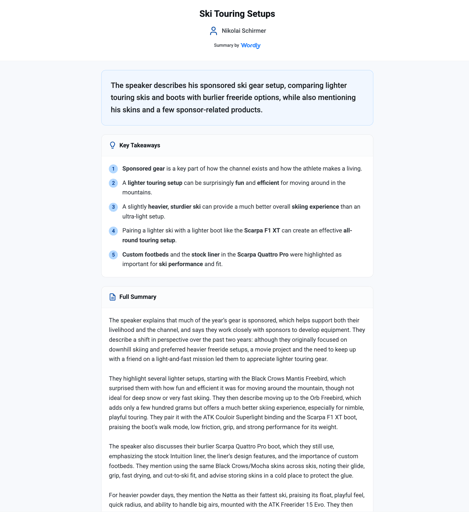
For Wordly Pro+ users, you can now create transcript summaries minutes after your session and post them online for your attendees. With Wordly's new Public Summaries, you can create a summary with key takeaways and posts it to a unique URL when you publish it. Once the summary is posted, attendees can view the summary and use their browser options to print the summary or save as a PDF.
For more information, read [Sharing Transcript Summaries](https://help.wordly.ai/sharing-transcript-summaries-online-with-attendees?hsLang=en).
Our initial Summaries feature has been deprecated and Public Summaries has replaced that feature. However, if you need the functionality of the original Summaries features, contact [support@wordly.ai](mailto:support@wordly.ai), and our team can reactivate your access to the original Summaries feature on your account.
- We've made vulnerability fixes across the Wordly platform for increased security.
#### Portal 4.10.0
- For Org Admins and Wordly Admins, we've added a session creator email column to the Usage reports.
- We've fixed the QR code logo alignment for long URLs.
### Aug 19, 2026
#### Android 4.6.0
We've updated the Wordly app for [Android.](https://play.google.com/store/apps/details?id=tech.wordly.android.present&hl=en_US)
- We've added support for customized attendee links and QR codes downloaded from the portal:
- You can create links that restrict the languages available.
- You can create links that enable Wordly to "Show only complete phrases."
- We've added legal links and an attribution page.
- We fixed an issue where text disappeared in the Session ID field.
### August 18, 2026
#### Portal 4.9.0
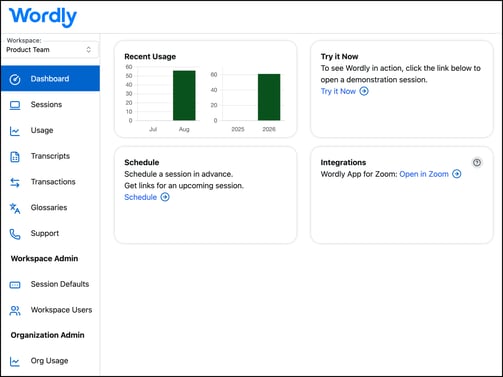
We've updated the look and feel of the Wordly portal. It now matches how Wordly appears in mobile and other Wordly apps
.
- For Org Admins and Wordly Admins, we've added User ID and created-by email columns to the Usage and Session report exports.
- We fixed an issue with links in downloaded QR codes with passcodes.
- We fixed an issue with the Transcript title formatting.
- In the Try it Now app, we fixed an issue with the language count.
- We've made vulnerability fixes across the Wordly platform for increased security.
#### Attend 4.2.3
- We fixed an issue where text-to-speech was not working for attendees on mobile.
- We fixed an issue in Display/High Contrast mode where the transcript and header text were clipped in the Chrome browser.
### August 12, 2026
#### Android 4.5.0
We've updated the Wordly app for [Android](https://play.google.com/store/apps/details?id=tech.wordly.android.present&hl=en_US) to make it easier to use for users with multiple workspaces.
- We've added a Workspace Selector for users with multiple workspaces. This lets you search for a workspace or select it from a list.
- The list of sessions now automatically updates based on the selected workspace.
- We've redesigned the login button for a cleaner sign-in experience.
- When you're in the Join as a speaker screen, you'll find the Log out link moved into the Workspace Selector menu.
- We've added accessibility support to the new Workspace Selector.
**Accessibility Support**
- We've added TalkBack support.
- We've added general accessibility refinements for attendees and presenters.
- We've improved the text layout on the app selection screen to prevent wrapping issues at larger text sizes.
### August 6, 2026
#### iOS 4.6.0
We've updated the Wordly app for [iOS:](https://apps.apple.com/us/app/wordly-translation/id1507412881)
- We added support for customized attendee links and QR codes downloaded from the Wordly portal:
- Customized links that restrict the languages available.
- Customized links that enable "Show only complete phrases."
- We've fixed a text issue with Automatic Language Selection.
- We've added legal links and an Attribution page.
July 25, 2026
#### Wordly for Microsoft Teams 2.1.0
We've make improvements to the Wordly app for Microsoft Teams:
**Noise Suppression**
The app now filters out echoes and background noise from the microphone. You can control this with a toggle in the audio settings.
**Accessibility Support**
We've improved screen-reader (TalkBack) accessibility across panels, dialogs and forms.
**Improved Experience**
- Audio, camera, and speaker selection now works better on mobile devices. Also screen sharing is hidden on phones that don't support it.
- Clearer messages now display when access is denied, when a call ends, or when a session expires.
- Dropdown menus now list the cameras, microphones, and speakers that can be chosen, so that your selection always matches what's in use.
**Bug Fixes**
- If the connection to Wordly silently drops during a meeting, the app now detects it within seconds and reconnects on its own, so captions and translations resume without anyone leaving and rejoining.
- Speech captured during a brief outage is buffered and sent through once the connection is restored, so words spoken during the drop still get transcribed instead of being lost.
- iPhone audio fixes so Wordly's spoken translations play reliably and other meeting audio gets quieter while the translation speaks.
- We've made several layout fixes for phones:
- Pages no longer overflow the screen.
- Panels scroll properly.
- The camera preview shows in portrait orientation.
- The self-view now is not mirrored, name tags are correctly sized, and the button now displays "Leave call" instead of "End call."
**Security Update**
A third-party dependency was updated to clear a critical security advisory.
#### Portal 4.8.0
We've made improvements in the Wordly portal.
**Rebranding**
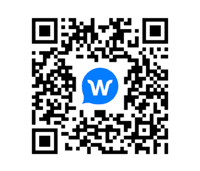
We've updated the look of QR codes to be shared.
**Bug fixes**
We've fixed the following issues:
- Where duplicate session join codes occurred across sessions.
- Where workspace owner lookup was returning the wrong user.
- An error saving custom fields.
- An issue that allowed deleting all your own accounts.
- Where there was an extended meeting-bot timeout when no participants are present.
We've also made accessibility fixes for subtitle-app configuration fields.
**Security and maintenance**
We've made vulnerability fixes across the Wordly platform for increased security.
### July 24, 2026
#### iOS 4.5.0
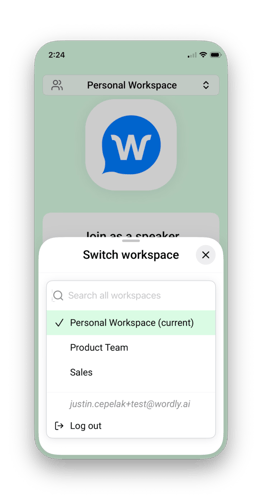
We've updated the Wordly app for [iOS](https://apps.apple.com/us/app/wordly-translation/id1507412881) to make it easier to use for users with multiple workspaces.
- We've added a Workspace Selector for users with multiple workspaces. This lets you search for a workspace or select it from a list.
- The list of sessions now automatically updates based on the selected workspace.
- We've redesigned the login button for a cleaner sign-in experience.
- When you're in the Join as a speaker screen, you'll find the Log out link moved into the Workspace Selector menu.
- We've added accessibility support to the new Workspace Selector.
### July 21, 2026
#### iOS 4.4.0
We've updated the Wordly app for [iOS](https://apps.apple.com/us/app/wordly-translation/id1507412881) for greater accessibility:
- Added VoiceOver support.
- General accessibility refinements for attendees and presenters.
- Improved text layout on the app selection screen to prevent wrapping issues at larger text sizes.
We've also:
- Fixed an issue where translated speech (TTS) could skip long phrases in certain languages.
- Added better support for entering field data on iPad
### July 20, 2026
We've made vulnerability fixes across the Wordly platform for increased security.
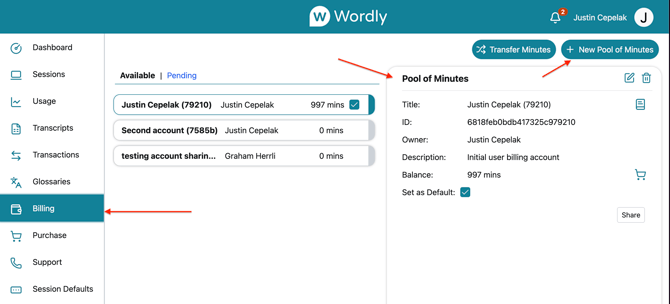
#### Wordly Portal 4.7.0
We've renamed some items in the portal to make it more clear what data you're viewing.
- The Accounts tab is now the Billing tab.
- Account is now "Pool of Minutes." When you want to share minutes, you now click "+ Pool of Minutes."
### June 29, 2026
#### Wordly Portal 4.6.0
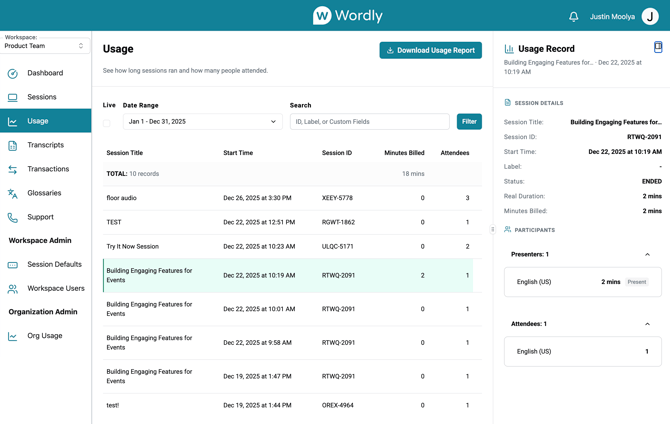
We've remade the Activity page, renaming it the Usage page.
- The new Usage page has the same functionality as the previous Activity page, but we've renamed the fields on the page to make it more clear what data you're viewing.
- The Usage page displays the past 30 days of usage of as a default. You can view usage from other periods of time by searching by custom date range.
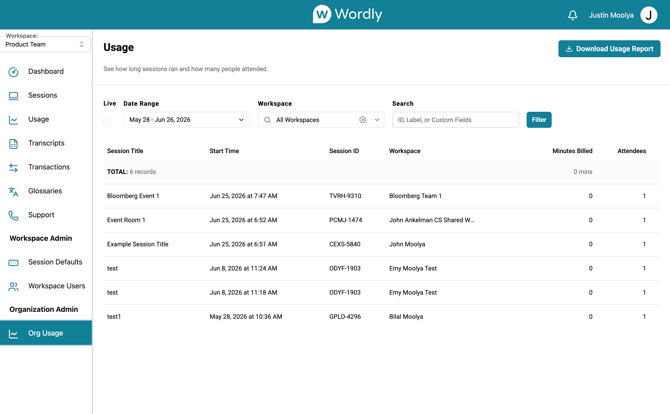
For SSO realms with shared workspaces, Organization Admins can now also view a new Org Usage page.
- This page allows you an organization-wide view of usage across all workspaces. This page also has the same functionality as the workspace usage pages.
- We've added a workspace filter to the Org Usage page. The Org Usage page also has the same filters as the workspace usage page.
### June 18, 2026
#### iOS 4.3.1
We've fixed the following issues in Wordly for [iOS](https://apps.apple.com/us/app/wordly-translation/id1507412881) 4.3.1:
- Wordly audio playback cutting off for certain longer messages.
- Wordly audio playback messages arriving out of order.
- Transcription failing to start on the Attend experience under certain conditions.
### June 15, 2026
#### Wordly for MS Teams 2.0.1
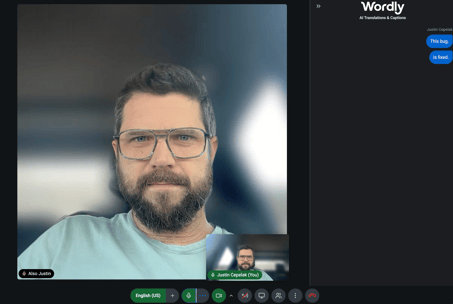
- We've fixed an issue where a blank video tile appears to other people in the meeting instead of displaying your correct camera view.
### June 9, 2026
#### Try It Now 2.0.0
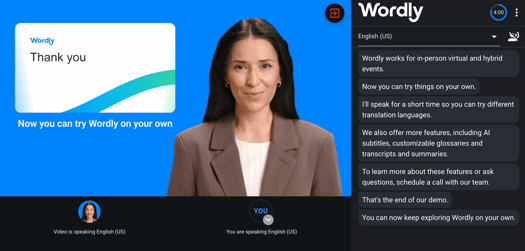
We've updated [try.wordly.ai](https://try.wordly.ai/app), Wordly's interactive demonstration platform, where you can explore how Wordly works.
- We've updated the website with our new colors and logo.
- We've updated the walkthrough videos.
June 4, 2026
#### Wordly for MS Teams 2.0.0
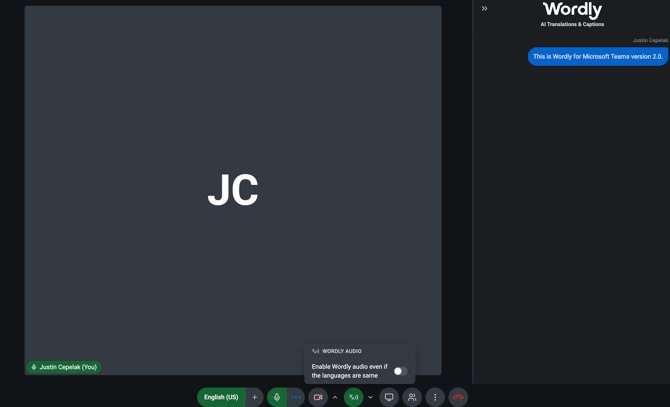
We've improved the Wordly App for Microsoft Teams for usability and accessibility.
- **Redesigned Meeting Controls & Dark Mode**
- We've completely redesigned meeting control panel with a unified toolbar.
- We've added a new dark mode for low-light environments.
- We updated the text on the text-to-speech button to make the action more clear.
- **Improved Accessibility**
- Better keyboard navigation and screen reader support on desktop and laptop.
- Dropdown menu now use a fully accessible custom component (instead of the browser default).
- **Better Mobile & Small Screen Experience**
- Improved experience on smaller screens, down to 320px wide.
- The control panel layout automatically adjusts for different device sizes.
- **Visual & Design Updates**
- We renamed "Translated Audio" to "Wordly Audio" for clarity.
- Screen-sharing presenter view now properly supports both dark and light modes.
- We've improved color the themes and visual consistency throughout the app.
- We've made it easier on the video tiles to identify what speaker is speaking at the moment.
****
- **Bug Fixes**
- Fixed scheduling meetings on past dates where possible.
- Fixed backspace key getting stuck when entering session IDs with hyphens.
- Fixed camera permission check showing the wrong error.
- Fixed video tile borders being cut off in certain layouts.
- Fixed popup windows occasionally appearing behind other elements.
- Fixed the warning badge appearing in the wrong position on the camera button.
### June 1, 2026
#### iOS 4.3.0
#### Android 4.3.0
We've updated the Wordly App for both [iOS](https://apps.apple.com/us/app/wordly-translation/id1507412881)and [Android](https://play.google.com/store/apps/details?id=tech.wordly.android.present&hl=en_US&pli=1).
- Now you can log into the Wordly app with your portal user login, using the Login button in the top right of the screen. This displays a list of your upcoming sessions in the "I'll Speak" mode when you tap on the session ID field.
- We've added support for Floor Audio sessions.
- We fixed an issue where transcriptions failed under poor internet connections.
- Better error handling.
- Other bug fixes.
### May 26, 2026
We've made vulnerability fixes across the Wordly platform for increased security.
#### Display 2.1.0
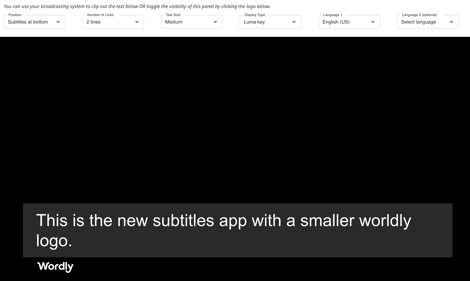
- We've updated the Wordly logo in the Subtitle app, making it smaller and positioning the logo at the bottom left of the screen. This change now emphasizes your translations in the display.
- The Display app now refreshes automatically between presentations.
- We fixed an issue where subtitle text was cut off in certain languages.
- We fixed an issue where the session would restart mid-session on the Subtitle/Display app under certain issues.
#### Present 5.1.0
- Custom install banner on Chrome Mobile (Android).
#### Wordly for MS Teams 1.8.1
- We've now added support for alpha characters in session passcodes.
- We've fixed an issue that occurred when signing in.
### May 2, 2026
#### Wordly for MS Teams 1.7.0
We've updated the Wordly translation app for Microsoft Teams and have included the following changes:
- **Optimized video tile layout** - We've refreshed the participant video panel for a cleaner, more consistent experience.
- **Participant panel layout** - The participant pane now occupies the same space as the transcription panel for a better experience.
- **Improved mobile experience** - The meeting layout and transcription panels are now optimized for mobile devices.
- **Smarter audio handling** - Audio recovers properly when switching devices mid-meeting, and your device preferences are saved
- **Better transcription display** - Right-to-left language text now displays correctly, and your own speech is no longer read back to you via text-to-speech.
- **Bug fixes & stability** - We resolved participant panel scrolling issues, security vulnerabilities, and language sync problems when the mic is muted.
### May 1, 2026
#### iOS Version app 4.2.0
We've updated the Wordly translation app for iOS and have included the following changes:
- We've added a new setting - "Play a virtual voice when speaker is speaking my own language. If you turn on this setting, you'll hear the text-to-speech read out the transcript messages when you enable audio, even if the speaker is speaking the same language that you''ve selected. This setting can be useful when it's hard to hear or understand the speaker. By default, this setting is disabled.
- If you open a new link while you're in another session, a window displays reminding you that there's already a session running. If you're attending a session, you have the option to leave your current session and join the new one. If you're running a session, you have the option to end your current session and join the new one.
- We've also fixed some issues.
You can find the app in Apple's [App Store](https://apps.apple.com/us/app/wordly-translation/id1507412881).
### April 29, 2026
We've made vulnerability fixes across the Wordly platform for increased security.
#### Attend 4.1.0
- Added banner for Android app.
### April 6, 2026
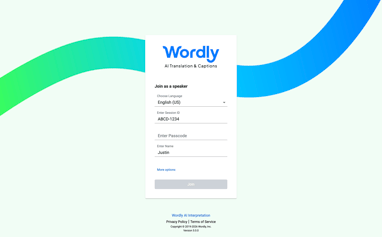
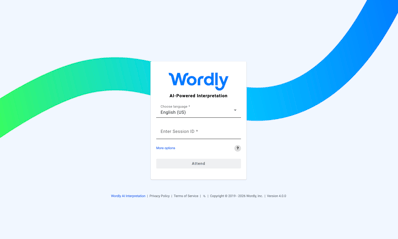
We've updated the look and feel of the Present app and the Attend app.
#### Present 5.0.0
- The Present app now has new brand colors and a new logo.
- We've optimized the app to fill the screen for mobile.
- We fixed an issue where a limited minutes warning displayed, despite having plenty of time.
#### Attend 4.0.0
- The Attend app now has new brand colors and a new logo.
- We've optimized the app to fill the screen for mobile.
### April 3, 2026
#### Wordly for Microsoft Teams 1.4.3
We've made the following improvements to the Wordly for Microsoft Teams 1.4.3:
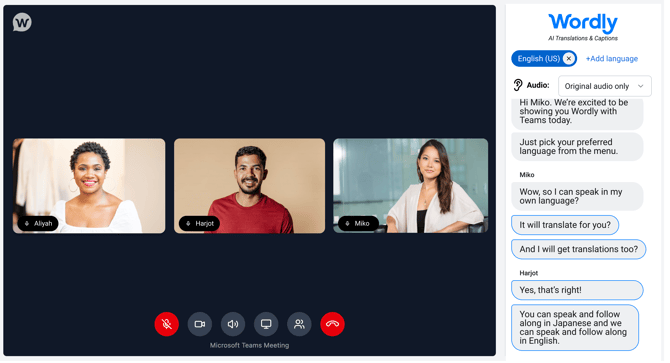
- We've added text-to-speech, so you can now listen to the translation.
- You can now add up to 3 languages for quick selection for multilingual speakers.
- When someone is sharing their screen, the presenting icon is small and in the corner so it no longer blocks their face.
- When you go to [teams.Wordly.ai](http://teams.Wordly.ai), the side navigation panel is now closed by default. To open it, click the 3 line menu ()in the top left.
- We've added 15-minute increments to the meeting scheduler.
- We've made it easier to grant admin approval to use Wordly for Microsoft Teams. Just send this link to your admin: [https://login.microsoftonline.com/organizations/adminconsent?client\_id=f934daa7-86bd-409d-96fc-7d88a5528525&redirect\_uri=https://teams.wordly.ai 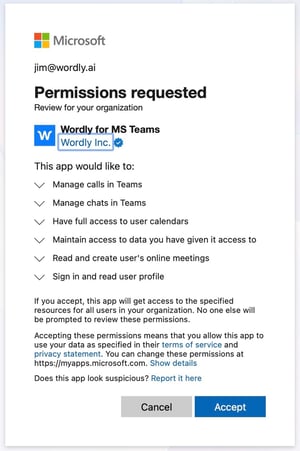](https://login.microsoftonline.com/organizations/adminconsent?client_id=f934daa7-86bd-409d-96fc-7d88a5528525&redirect_uri=https://teams.wordly.ai)
### March 30, 2026
#### Portal 4.2.0
- We've made some improvements to the "Ways to Join a Session" page:
- The "Ways to Join a Session" page now displays the session QR code in the first "Join On Personal Devices" panel. You can also view the QR code with the passcode embedded or without.
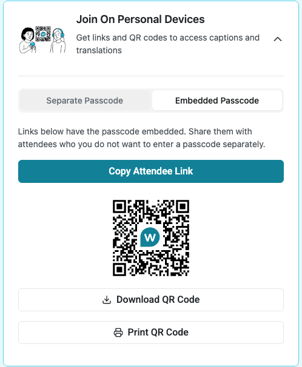
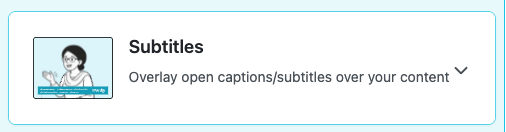
- We've added the Subtitle app link to the Attendees column.
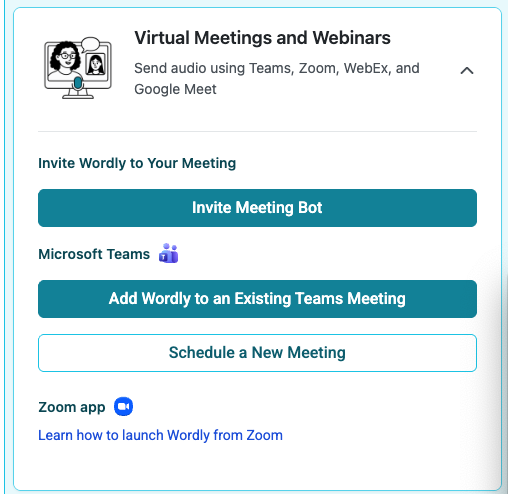
- We've added "Wordly for Microsoft Teams" to the "Virtual Meetings and Webinars" panel. We've also moved information about the Wordly for Zoom app to "Virtual Meetings and Webinars."
- We've made improvements to language counts in Downloaded Activity and Usage reports.
### March 19, 2026
We've made vulnerability fixes across the Wordly platform for increased security.
#### Portal 4.1.1
- The "Ways to Join a Session" page now creates QR codes with embedded passcodes with you select "Print QR codes."
#### Present 4.8.1
- We've fixed an issue where intermittent autoscroll interruptions in Present sessions prevented the live transcript from continuously updating for viewers.
#### Display 2.0.1
- You can now add deep linking when using the Subtitle and Display apps, so that you can add a ""Ways to Join a Session" link to the display.
#### Attend 3.9.4
- The Wordly logo displays now correctly even when only one language is selected in the Attend app.
### March 9, 2026
#### Portal 4.1.0
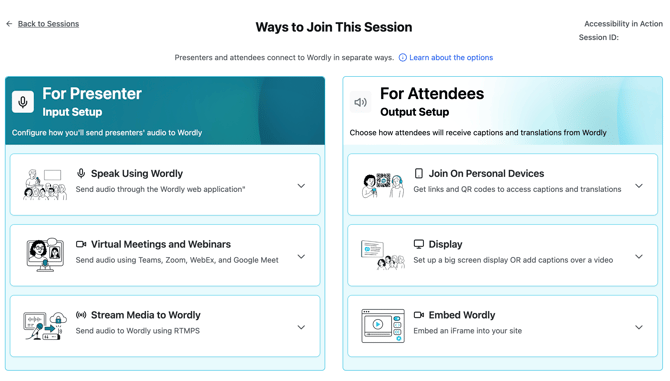
- **New Ways to Join a Session.** We've redesigned our user experience for getting meeting links to join a session. This makes it easier to get the information that you need.
- Select a session, then click the **Get Links to Join** button
- Links for presenters display on the left and links for attendees display on the right from the "Ways to Join This Session" page.
- From "Speak Using Wordly," you can join the session as a presenter immediately or copy the link for sharing. Read [Hosting Your Wordly Session](https://help.wordly.ai/hosting-your-wordly-session?hsLang=en) for more information.
- From "Virtual Meetings and Webinars," you can invite the Wordly Meeting Bot to your [Microsoft Teams](https://help.wordly.ai/using-meeting-bot-for-microsoft-teams?hsLang=en), [Zoom](https://help.wordly.ai/use-wordly-with-zoom-no-app-required?hsLang=en),[WebEx](https://help.wordly.ai/use-wordly-with-webex?hsLang=en), and [Google Meet](https://help.wordly.ai/use-wordly-with-google-meet?hsLang=en) meetings.
- From "Stream Media to Wordly," you can copy the stream URL and key for [RTMP streaming](https://help.wordly.ai/rtmp-streaming?hsLang=en).
- From "Join On Personal Devices," you can get[links](https://help.wordly.ai/sharing-the-session?hsLang=en) or [QR codes](https://help.wordly.ai/downloading-qr-codes?hsLang=en) to share with attendees.
- From "Display," you can open the Wordly Display link to set up a big screen display or add captions over a video.
- From Embed Wordly, you can copy the iFrame Attend URL so you can [embed Wordly captions with an iFrame](https://help.wordly.ai/iframe-integration?hsLang=en) in your livestream or video platform.
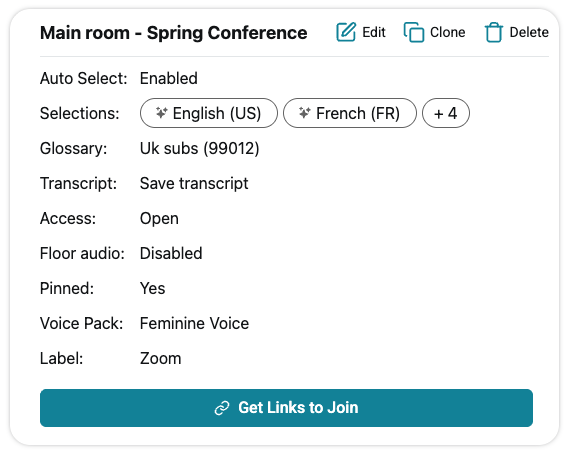
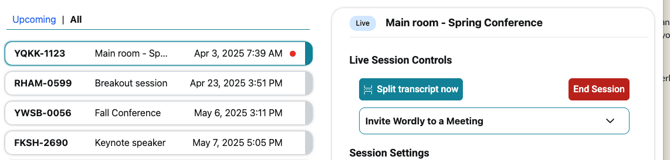
- Additionally, you will notice some other changes to the session details panel
- The menu has been replaced with **Edit**, **Clone**, and **Delete** buttons (the other options were moved to the Ways to Join page)
- When you have an active session, you will see a red dot in the list, and in the details panel you will find the **Live Session Controls** embedded, so you no longer have to open a modal to access these controls
#### Display 2.0.0
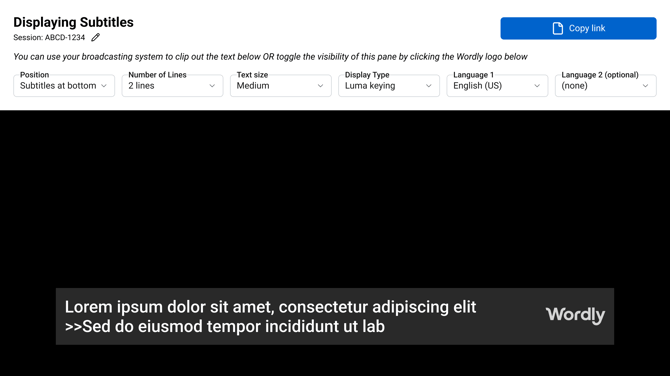
- **New Subtitles App.** We've released the Subtitle app for Wordly, with a brand new interface to make it easier to overlay subtitles. With the Subtitle app, you can display Wordly on a screen or overlay Wordly on top of video to provide open subtitles for viewing. Read[Incorporating Wordly in Video Systems](https://help.wordly.ai/incorporate-wordly-in-video-systems?hsLang=en) to learn more about using the Subtitle app.
Use the Subtitles app for Wordly by going to [https://display.wordly.ai/subtitle.](https://display.wordly.ai/subtitle)
### March 2, 2026
### **Wordly for Microsoft Teams 1.0**
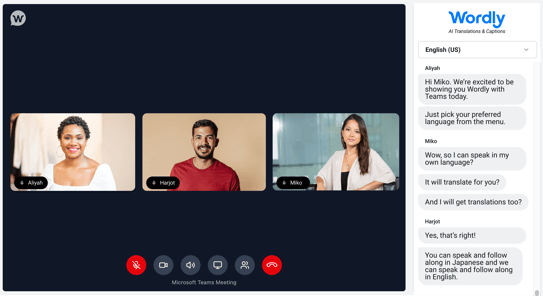
- Wordly has released Wordly for Microsoft Teams, a companion web application that bridges Microsoft Teams and Wordly translation into a single interface. Microsoft Teams users can join their meetings in Wordly's app and view live translations in their preferred language.
To use the Wordly for Microsoft Teams app, go to [teams.wordly.ai](https://teams.wordly.ai/schedule). To learn how to use the Wordly for Microsoft Teams app, read [Using the Wordly for Microsoft Teams app](https://help.wordly.ai/using-wordly-teams?hsLang=en).
### February 23, 2026
### **Portal 4.0.3**
- When you save after either creating or editing a session, you can note that the session now remains correctly selected in the list.
- The Summary disclaimer at the bottom of Transcript Summaries reads "Summaries generated by AI."
- Fixed a settings issue, so voice transcripts now correctly honor the voice pack selection (in Advanced Settings).
- We've made vulnerability fixes for increased security.
February 9, 2026
### **Portal 4.0.2**
- Fixed an issue where success messages were duplicated.
- Icon now no longer displays for non-editable glossaries.
- Fixed an issue where custom fields when required were incorrectly filling default values.
### **API 1.11.0**
- New **[Transcript API](https://api.wordly.ai/reference#transcript:~:text=Stream-,Transcript,-APIs%20for%20listing)**that you can use for listing, deleting, and downloading a user's transcripts, translations, and summaries.
- We've made vulnerability fixes for increased security.
- Check out the [Wordly API Changelog](https://help.wordly.ai/api-changelog?hsLang=en) for all Wordly API changes.
### **Zoom 1.15.3**
- We've made vulnerability fixes for increased security.
- Fixed a localization issue.
- Check out the [Wordly App for Zoom Changelog](https://help.wordly.ai/api-changelog?hsLang=en) for all Wordly for Zoom changes.
January 26, 2026
### **Portal 4.0.0**
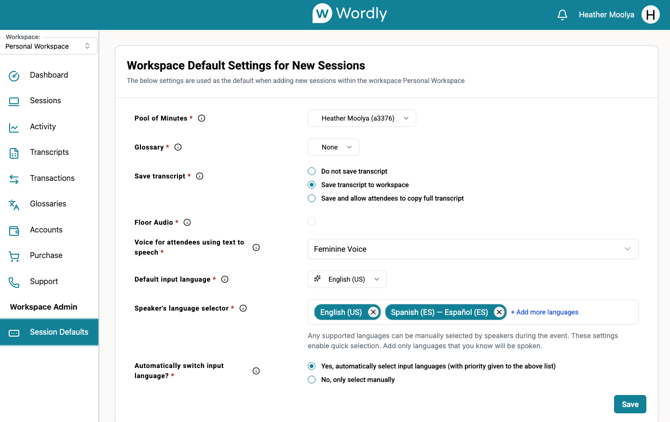
- We've improved the user experience in the Wordly portal, so you can locate the information that you need. These changes include:
- A new Session Defaults page that you can access from the left side menu.
- An updated User Profile page.
- Updated the language for selecting transcripts when creating a session. This change clarifies what options are available.
- We've added Brazilian Portuguese as a new locale to choose for your profile.
### January 15, 2026
### **Attend app 3.9.0**
- Made improvements to scrolling, margins, and accessibility.
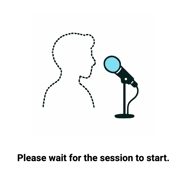
- Now when an attendee joins before a presenter joins, they see the message "Please wait for the session to start."
### **Display app 1.10.0**
- Made improvements to text display and accessibility.
### January 13, 2026
### **Present app 4.7.0**
- Added the setting "Play a virtual voice when the speaker is speaking my own language." When this setting is not selected, Text To Speech is muted if the speaker's language matches the attendee's language.
- Fixed bugs and enhanced usability.
#### **Portal 3.32.0**
- Fixed bugs and enhanced usability.
December 18, 2025
#### **Wordly Translation native mobile apps for iOS and Android version 4.0**
**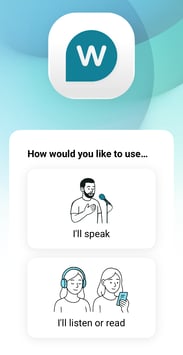**
- Streamlined user experience with a brand new, intuitive design.
- The app will now will continue to play and/or record audio in the background if you switch to another app or if the screen sleeps.
- Push-to-Talk is now available for audio input, making 2-way conversation easier.
- Wordly can detect what language is being spoken and automatically switch the input language.
- To download or update the Wordly app, go to:
- iOS: [https://apps.apple.com/us/app/wordly-translator/id1507412881](https://apps.apple.com/us/app/wordly-translator/id1507412881).
- Android: [https://play.google.com/store/apps/details?id=tech.wordly.android.present](https://play.google.com/store/apps/details?id=tech.wordly.android.present)
November 19, 2025
#### **Portal 3.31.0**
- Transcript Splitting: You can now split transcripts, without ending the session, in the Portal using the Live Session Control dialog.
Read [Splitting Transcripts](https://help.wordly.ai/splitting-transcripts?hsLang=en)to learn how to use this feature.
- Fixes:
- Removed the Delete button from the Summaries tab as it actually deleted the transcript and was therefore misleading.
- Fixed broken Knowledge Center links.
- Fixed issues with how summaries display, including missing paragraph breaks and incorrect spacing after apostrophes.
#### **Present Version 4.6.0**
- Transcript Splitting: You can now split transcripts, without ending the session, using the Present App.
Read [Splitting Transcripts](https://help.wordly.ai/splitting-transcripts?hsLang=en)to learn how to use this feature
- Fixes:
- Fixed an issue where the wrong logo was displayed on the transcript page.
- Fixed an issue where audio might not be sent if you mute/unmute too quickly.
#### **Display 1.9.2**
- Fix:
- Resolved an issue where margin settings were not being saved or "persisting" between sessions.
#### **Attend 3.8.3**
- Fix:
- - Resolved an issue causing a transparent background when using the iFrame.
- Security: Applied necessary vulnerability fixes.
### November 19, 2025
#### **Portal Version 3.30.0**
- **Voice Transcripts.** You can now create AI dubs that you can add to your recorded meetings, trainings, and conferences with Voice Transcripts. Voice Transcripts lets you download transcripts of AI-generated MP3 files. This option is available for Wordly Pro+, Corporate, Corporate+, and Enterprise plans.
For more information, read [Translating transcripts.](https://help.wordly.ai/translating-transcripts?hsLang=en)
- **Better Summaries**. Transcript summaries have been updated so you get longer, more detailed summaries.
- *Note: Paragraph breaks are missing in this deployment, but will be added next week. For now, when you copy the summary (using the copy button at the bottom), you will see the paragraphs when you paste it into another context.*
- **Fixed**: An issue that appeared when processing certain invalid media files.
### October 21, 2025
#### **Present App Version 4.5.0**
- **New and improved** **colors** for better accessibility.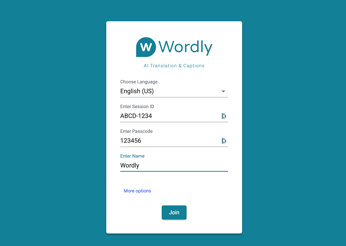
- Fixed: Microphone and Audio Output buttons swapped positions.
- Fixed: Missing localization string in the settings dialog.
- Fixed: Speech bubble outline indicating text-to-speech playback was slightly off.
### October 13, 2025
#### **Portal Version 3.27.0**
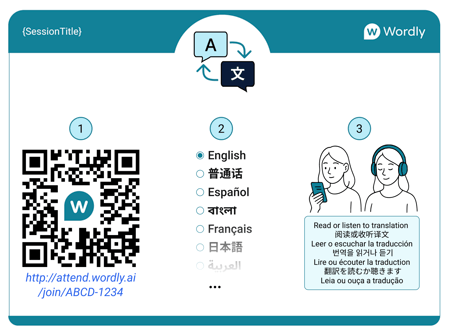
- **New and improved QR code with Instructions**. We've updated the graphics to more clearly communicate the steps to attend a session, and we've added instructions in 7 languages.
- Fixed: When uploading sessions, custom select fields were marked as required even when they were optional.
### October 3, 2025
#### **Portal Version 3.26.0**
- We've made a change to the user experience when the Wordly app for attendees no longer has the default setting of playing the text-to-speech (TTS) voice if the speaker language matches the attendee language.
We expect that the attendee can hear and understand the speaker. However, if someone wants to hear the TTS voice in the same language, they need to set this in the Attendee settings screen.
To set up TTS voice when speaker is speaking attendee's language:
1\. Join Wordly as an attendee in Normal display mode.
2\. Select the gear button ().
3\. Check the Play a virtual voice when the speaker is speaking my own language checkbox and click Apply.
### June 30, 2025
#### **Portal Version 3.25.0**
- General release of transcript summaries.
- Adds support for custom fields in bulk upload spreadsheets.
- No longer pins sessions created by “try-it-now”.
- Security and dependency updates.
### June 16, 2025
#### **Portal Version 3.24.0**
- Adds transcript summaries downloads.
- Security and dependency updates.
### June 2, 2025
#### **General Update**
- Adds Urdu as a speaker language.
- Adds Bosnian, Haitian Creole, Lao, and Zulu as attendee languages.
#### **Portal Version 3.23.0**
- Adds transcript summaries.
- Fixes issue with session report sometimes missing newest session.
- Fixes issue with Cantonese glossary replace rules.
- Changes voice pack names to Feminine and Masculine.
- Security and dependency updates.
#### **Display App Version 1.9.0**
- Fixes issue with small frame text jitter.
- Improves behavior of Save button.
- Security and dependency updates.
#### **Attend App Version 3.5.0**
- Updates copyright version.
- Security and dependency updates.
#### **Wordly API Version 1.10.0**
- Security and dependency updates.
- Check out the [Wordly API Changelog](https://help.wordly.ai/api-changelog?hsLang=en) for more information.
### May 19, 2025
#### **Portal Version 3.22.0**
- Adds support for multiselect-select and numeric custom fields.
### May 5, 2025
#### **Portal Version 3.20.0**
- Updates QR-Codes to high-resolution formats.
- Adds support for single-select and required custom fields.
- Fixes issue where TTS samples may stop playing.
- Security and dependency updates.
### April 7, 2025
#### **Display App Version 1.8.0**
- Adds option for custom background color.
- Improves screen layout interface.
- Security and dependency updates.
### March 31, 2025
#### **Wordly App for Zoom Version 1.13.0**
- Adds option to show only complete phrases.
- Security and dependency updates.
- Check out the [Wordly App for Zoom Changelog](https://help.wordly.ai/api-changelog?hsLang=en) for more information.
### March 7, 2025
#### **Portal Version 3.19.0**
- Improves account invitation handling.
- Security and dependency updates.
### March 4, 2025
#### **Portal Version 3.18.0**
- Adds transcript status to activity reports.
- Improves transcript management.
- [Improves Wordly session support](https://www.wordly.ai/wordly-support).
- Security and dependency updates.
#### **Wordly API Version 1.9.0**
- Improves transcript management.
- Security and dependency updates.
- Check out the [Wordly API Changelog](https://help.wordly.ai/api-changelog?hsLang=en) for more information.
### February 24, 2025
#### **Display App Version 1.7.0**
- Adds option for four separate margins.
- Security and dependency updates.
### February 2, 2025
#### **Portal Version 3.17.0**
- Fixed issue with bot status not updating.
- Improves glossary invitation handling.
- Security and dependency updates.
### December 26, 2024
#### **Wordly API Version 1.8.0**
- Adds custom session fields to session calls.
- Security and dependency updates.
- Check out the [Wordly API Changelog](https://help.wordly.ai/api-changelog?hsLang=en) for more information.
### December 20, 2024
#### **Portal Version 3.16.0**
- Adds support for custom session fields.
- Improves session, transaction and activity reports.
- Security and dependency updates.
### December 18, 2024
#### **Present App Version 3.0.0**
- Adds automatic language selection support.
- Adds audio visualization.
- Minor bug fixes.
- Security and dependency updates.
### November 22, 2024
#### **Portal Version 3.15.0**
- Adds support for QR code extra parameters.
- Security and dependency updates.
### November 1, 2024
#### **Portal Version 3.14.0**
- Adds support for Kannada and Macedonian.
- Fix issue with glossary language section names.
#### **Wordly API Version 1.7.0**
- Adds automatic language selection (ALS) support for streaming.
- Adds support for Kannada and Macedonian.
- Check out the [Wordly API Changelog](https://help.wordly.ai/api-changelog?hsLang=en) for more information.
### October 25, 2024
#### **Portal Version 3.13.0**
- Adds voice transcripts.
- Adds edit icon to glossary language sections.
### October 11, 2024
#### **Wordly App for Zoom Version 1.12.0**
- Adds automatic language selection support.
- Updates host language controls.
- Security and dependency updates.
- Check out the Wordly App for Zoom Changelog for more information.
### September 20, 2024
#### **Portal Version 3.12.0**
- Updates streaming ALS controls.
- Updates bot ALS controls.
- Security and dependency updates.
### August 30, 2024
#### **Portal Version 3.11.0**
- Adds automatic language selection (ALS) defaults.
- Improves profile layout.
- Security and dependency updates.
#### **Present App Version 2.4.0**
- Adds Push-to-Talk.
- Security and dependency updates.
### August 26, 2024
#### **Android Phone App Version 3.0.0**
- Bump target Android version to 34
- Minor bug fixes.
- Security and dependency updates.
### August 9, 2024
#### **Attend App Version 3.4.0**
- Adds speaker names in frame mode.
- Adds Brazilian Portuguese localization.
- Fixes conflict with Chrome AudioPicker plugin.
- Security and dependency updates.
#### **Present App Version 2.3.0**
- Security and dependency updates.
#### **Display App Version 1.6.0**
- Adds option for showing speaker names.
- Security and dependency updates.
### August 2, 2024
#### **Wordly App for Zoom Version 1.11.0**
- Adds customer oauth token refresh.
- Security and dependency updates.
- Check out the [Wordly App for Zoom Changelog](https://help.wordly.ai/zoom/changelog/?hsLang=en) for more information.
### July 26, 2024
#### **General Update**
- Adds Catalan and Georgian.
- Adds Armenian as attendee only language.
- Adds “sounds-like” annotations to glossary.
### May 17, 2024
#### **Present App Version 2.2.0**
- Security and dependency updates.
### May 16, 2024
#### **Wordly API Version 1.6.0**
- Adds media transcription and translation APIs.
- Security and dependency updates.
- Check out the [Wordly API Changelog](https://help.wordly.ai/api-changelog?hsLang=en) for more information.
### May 2, 2024
#### **Android Phone App Version 2.21.0**
- Bump minimum Android version to 10
- Adds support for 20+ new languages.
- Adds support for more natural voices.
- Security and dependency updates.
- Miscellaneous bug fixes.
### April 19, 2024
#### **Portal Version 3.10.0**
- Adds transcript translation delete.
- Fixes timestamp offset in text download.
- Security and dependency updates.
#### **Wordly App for Zoom Version 1.10.0**
- Minor bug fixes.
- Security and dependency updates.
- Check out the [Wordly App for Zoom Changelog](https://help.wordly.ai/zoom/changelog/?hsLang=en) for more information.
### March 22, 2024
#### **Display App Version 1.5.0**
- Saves display margins in URL.
- Security and dependency updates.
### March 1, 2024
#### **Portal Version 3.9.0**
- Adds timestamp offsets to transcript downloads.
- Fixes some Spanish localizations.
- Security and dependency updates.
#### **Display App Version 1.4.0**
- Adds display margins.
- Security and dependency updates.
### February 16, 2024
#### **Display App Version 1.3.0**
- Display banner on session end.
- Security and dependency updates.
### January 17, 2024
#### **IOS Phone App Version 2.21.0**
- Bump minimum iOS version to 12.0
- Adds support for 20+ new languages.
- Adds support for more natural voices.
- Security and dependency updates.
- Miscellaneous bug fixes.
### January 5, 2024
#### **Attend App Version 3.3.0**
- Improvements to spoken output.
- Scrolling fixes.
- Security and dependency updates.
### December 21, 2023
#### **Portal Version 3.8.0**
- #### Adds support for meeting bots in teams, google meet and zoom.
- Security and dependency updates.
### October 27, 2023
#### **Portal Version 3.7.0**
- Dependency and accessibility updates.
### October 6, 2023
#### **Present App Version 2.1.0**
- Integrates support for nineteen new languages that can be spoken by a presenter.
- Security and dependency updates.
#### **Attend App Version 3.2.0**
- Integrates support for seventeen new languages that can be selected by an antendee.
#### **Display App Version 1.2.0**
- Integrates support for seventeen new languages that can be shown for translation.
- Security and dependency updates.
#### **Portal Version 3.6.0**
- Integrates support for nineteen new languages that can be selected by the presenter.
- Integrates support for seventeen new languages that can be selected for translation.
- Adds the ability to clone sessions.
- Updates the streaming language controls.
- Security and dependency updates.
- Miscellaneous bug fixes.
#### **Wordly App for Zoom Version 1.9.0**
- Integrates support for nineteen new languages that can be selected by the presenter.
- Integrates support for seventeen new languages that can be selected for translation.
- Security and dependency updates.
- Check out the [Wordly App for Zoom Changelog](https://help.wordly.ai/zoom/changelog/?hsLang=en) for more information.
### September 22, 2023
#### **Display App Version 1.1.0**
- Adds a reload button to clear transcripts.
- Verifies the session ID and passcode before starting.
- Changes fullscreen to fullwindow mode.
- Adds language name to each panel.
- Implements URL encoding to save display state.
- Miscellaneous bug fixes.
### August 25, 2023
#### **Present App Version 3.1.0**
- Adds the showScrollbar frame parameter.
### August 11, 2023
#### **Present App Version 2.0.0**
- Security and dependency updates.
#### **Display App Version 1.0.0**
- Initial release.
- Displays multiple languages on the same screen.
### August 4, 2023
#### **Portal Version 3.5.0**
- Adds the voice pack to the upload spreadsheet.
- Updates dependencies.
- Miscellaneous bug fixes.
#### **Present App Version 1.8.0**
- Security and dependency updates.
#### **Wordly App for Zoom Version 1.8.0**
- Security and dependency updates.
- Check out the [Wordly App for Zoom Changelog](https://help.wordly.ai/zoom/changelog/?hsLang=en) for more information.
### June 30, 2023
#### **Portal Version 3.4.0**
- Updates the interface so navigation menu is always expanded.
- Updates framework and dependencies.
### June 10, 2023
#### **Portal Version 3.3.0**
- Adds manage email and password link to profiles.
### May 18, 2023
#### **Portal Version 3.2.0**
- Adds the Wordly logo to QR codes.
- Fixes the session download search filter.
- Adds copy and refresh for developer API keys.
- Adds speaker language to transcript bubbles.
- Changes the name of QR downloads from “session\_qr\_codes” to “Wordly\_QR\_Codes” for clarity.
### May 9, 2023
#### **Wordly App for Zoom Version 1.7.0**
- Minor bug fixes.
- Check out the [Wordly App for Zoom Changelog](https://help.wordly.ai/zoom/changelog/?hsLang=en) for more information.
### May 8, 2023
#### **Wordly App for Zoom Version 1.6.0**
- Enables Zoom App in Mobile Zoom clients.
- Check out the [Wordly App for Zoom Changelog](https://help.wordly.ai/zoom/changelog/?hsLang=en) for more information.
### April 21, 2023
#### **Wordly API Version 1.5.0**
- Security and dependency updates.
- Check out the [Wordly API Changelog](https://help.wordly.ai/api-changelog?hsLang=en) for more information.
#### **Present App Version 1.7.0**
- Security and dependency updates.
### April 3, 2023
#### **IOS Phone App Version 2.20.0**
- Security and dependency updates.
- Miscellaneous bug fixes.
### March 24, 2023
#### **Android Phone App Version 2.20.0**
- Security and dependency updates.
- Miscellaneous bug fixes.
### March 17, 2023
#### **Portal Version 3.1.0**
- Adds the session label to activity and transaction reports.
- Changes the name of the activity report from “UsageSummary” to “Activity Report” to be more consistent with other reports.
#### **Wordly API Version 1.4.0**
- Adds a Captions API that will send live captions from an ongoing Wordly session to a provided webhook URL.
- Check out the [Wordly API Changelog](https://help.wordly.ai/api-changelog?hsLang=en) for more information.
### March 3, 2023
#### **Wordly App for Zoom Version 1.5.0**
- Internal improvements to improve availability.
- Check out the [Wordly App for Zoom Changelog](https://help.wordly.ai/zoom/changelog/?hsLang=en) for more information.
### February 16, 2023
#### **Portal Version 3.0.0**
- Session owners can now specify a ‘voice pack’ for their sessions to control the set of voices available to attendees.
- Security updates.
#### **Attend App Version 3.0.0**
- Updates to use more naturally sounding voices.
- Security updates.
#### **Wordly API Version 1.3.0**
- Adds a voicePackId field to the Sessions API that allows for a voice pack to be optionally specified when creating and updating sessions.
- Check out the [Wordly API Changelog](https://help.wordly.ai/api-changelog?hsLang=en) for more information.
### January 30, 2023
#### **Portal Version 2.22.0**
- Enhances glossaries with replacement phrases. Customers can use this feature to improve transcription and translation accuracy.
- A variety of small interface improvements were made in the [Wordly Portal](https://portal.wordly.ai/).
#### **Wordly API Version 1.2.0**
- Updates the glossary model in the Wordly API to support the new enhanced glossaries.
- Check out the [Wordly API Changelog](https://help.wordly.ai/api-changelog?hsLang=en) for more information.
- [The Wordly Portal](https://help.wordly.ai/the-wordly-portal?hsLang=en#main-content)
- [Navigating Your Portal](https://help.wordly.ai/the-wordly-portal?hsLang=en#navigating-your-portal)
- [Multi-Portal Sharing](https://help.wordly.ai/the-wordly-portal?hsLang=en#multi-portal-sharing)
- [Creating Your Wordly Session](https://help.wordly.ai/creating-your-wordly-session?hsLang=en#main-content)
- [Session Basics](https://help.wordly.ai/creating-your-wordly-session?hsLang=en#session-basics)
- [Automatic Language Selection](https://help.wordly.ai/creating-your-wordly-session?hsLang=en#automatic-language-selection)
- [Hosting a Wordly Session](https://help.wordly.ai/hosting-a-wordly-session?hsLang=en#main-content)
- [Hosting Basics](https://help.wordly.ai/hosting-a-wordly-session?hsLang=en#hosting-basics)
- [Transcripts](https://help.wordly.ai/hosting-a-wordly-session?hsLang=en#transcripts)
- [In-Person Events](https://help.wordly.ai/hosting-a-wordly-session?hsLang=en#in-person-events)
- [Glossaries](https://help.wordly.ai/glossaries?hsLang=en)
- [Reporting](https://help.wordly.ai/reporting?hsLang=en)
- [Integrations and APIs](https://help.wordly.ai/integrations-and-apis?hsLang=en#main-content)
- [Wordly with AV Systems](https://help.wordly.ai/integrations-and-apis?hsLang=en#wordly-with-av-systems)
- [Wordly for Zoom](https://help.wordly.ai/integrations-and-apis?hsLang=en#wordly-for-zoom)
- [Streaming To Non-Integrated Platforms](https://help.wordly.ai/integrations-and-apis?hsLang=en#streaming-to-non-integrated-platforms)
- [Wordly for Cvent](https://help.wordly.ai/integrations-and-apis?hsLang=en#wordly-for-cvent)
- [Wordly for Webex](https://help.wordly.ai/integrations-and-apis?hsLang=en#wordly-for-webex)
- [Wordly for Google Meet](https://help.wordly.ai/integrations-and-apis?hsLang=en#wordly-for-google-meet)
- [Wordly for Microsoft Teams](https://help.wordly.ai/integrations-and-apis?hsLang=en#wordly-for-microsoft-teams)
- [APIs and Developer Tools](https://help.wordly.ai/integrations-and-apis?hsLang=en#apis-and-developer-tools)
- [Platform Updates and Releases](https://help.wordly.ai/platform-updates-and-releases?hsLang=en)
- [FAQ](https://help.wordly.ai/faq?hsLang=en)
- [Self-Onboarding](https://help.wordly.ai/self-onboarding?hsLang=en#main-content)
- [I'm a place of worship using Wordly for our weekly services](https://help.wordly.ai/self-onboarding?hsLang=en#im-a-place-of-worship-using-wordly-for-our-weekly-services)
- [I'm using Wordly in-person for a meeting, conference, or event](https://help.wordly.ai/self-onboarding?hsLang=en#im-using-wordly-in-person-for-a-meeting-conference-or-event)
- [I'm using Wordly with a virtual meeting or event platform](https://help.wordly.ai/self-onboarding?hsLang=en#im-using-wordly-with-a-virtual-meeting-or-event-platform)
- [I'm using Wordly with both attendees in person and attendees online at the same event](https://help.wordly.ai/self-onboarding?hsLang=en#im-using-wordly-with-both-attendees-in-person-and-attendees-online-at-the-same-event)
- [I'm using Wordly for one-on-one conversations.](https://help.wordly.ai/self-onboarding?hsLang=en#im-using-wordly-for-one-on-one-conversations)
- [I'm looking for AV setup guides](https://help.wordly.ai/self-onboarding?hsLang=en#im-looking-for-av-setup-guides)
- [I'm using Wordly in a way that's not listed above.](https://help.wordly.ai/self-onboarding?hsLang=en#im-using-wordly-in-a-way-thats-not-listed-above)
- [Attending Wordly Sessions](https://help.wordly.ai/attending-wordly-sessions?hsLang=en)
[Privacy Policy](https://wordly.ai/privacy-policy) | [Terms of Service](https://wordly.ai/wordly-inc-terms-of-service)
Copyright © 2026, Wordly, Inc.
```json
{
"@context" : "https://schema.org",
"@type" : "VideoObject",
"caption" : {
"@type" : "MediaObject",
"contentUrl" : "https://help.wordly.ai/media-transcripts/201592927629/en.vtt",
"inLanguage" : "en",
"name" : "en Captions"
},
"contentUrl" : "https://5315820.fs1.hubspotusercontent-na1.net/hubfs/5315820/Knowledge%20Base%20Graphics/Split_Transcript.mp4",
"dateModified" : "2026-07-23T21:08:26.118Z",
"duration" : "PT3M11S",
"height" : 1080,
"name" : "Split_Transcript",
"thumbnailUrl" : "https://5315820.fs1.hubspotusercontent-na1.net/hubfs/5315820/Knowledge%20Base%20Graphics/Split_Transcript.mp4/medium.jpg",
"uploadDate" : "2025-12-02T23:02:21.933Z",
"width" : 1920
}
```